Showing posts with label Tutorial. Show all posts

Top Three Ways to Support Local Writers for FREE

I get it, books are expensive. As much as you want to buy books, there’s bills to pay, kids to be feed, and you’d really like a pair of sneakers without holes so you can walk your dog through puddles without having squelchy socks afterwards – or is that just me?

So you might have found yourself asking: 

How can I support local authors for free? 


Good news, there is a number of easy ways that you can help your favourite local authors without spending cold hard cash. 

Here's my Top 3 Ways to Support Local Writers for FREE 


Number 1: Visit Your Local Library.


Libraries want to provide books that their members – that’s You – want to read.
And speaking from personal experience Libraries are extremely supportive of local authors.

[I am certainly Thankful to my local library the Dunedin Public Library for all the support they’ve given me and my fellow Dunedin Speculative Fiction Writers as pictured below]

The DPL Hosts Dunedin Speculative Fiction Writers' Panel "Genre8: Flights of Fantasy"

So go in and find out if your local library stocks the books of your local author – if not, find out how you go about recommending a book. Yes, that’s right, You can recommend books to libraries!

And when they get the book in, or if they all ready have the book on the shelf BORROW it. 


The Dunedin Public Libraries display a Collection of Local Authors books acquired during 2018

This may seem obvious, but actually borrowing a book from a library helps your favourite local author because here’s the thing, libraries keep stats on how many times books are read and authors get paid via a library fund system if their book reaches a certain threshold.

So if you feel badly that you can’t afford to buy a book, by actively borrowing those books from libraries you are still helping your local author. Win-win.

And you know what? Even though you don’t own the book, You can still write a review for the book on Goodreads.

Number 2: Join Goodreads.


What’s Goodreads? I’m glad you asked...
"Goodreads is the world's largest site for readers and book recommendations. Our mission is to help people find and share books they love."
After joining go look up your favourite authors and hit the Follow Button on their author profile page. As per the example below of local Dunedin writer Deb E Howell:


Then go through their books and add them to your hypothetical To-Be-Read pile by clicking the Want to Read button.


If you’ve already read those books even better, Click Read, and give a star rating.


Undoubtedly the best thing and most supportive is to Write A Review at this stage. A star rating is nice, but reviews get noticed, reviews count, reviews are worth three times their weight in gold.

Relax though, this isn’t hard.

Reviews don’t have to be a grandiose statement of delightful prose discussing the finer points of theme, whimsy and narrative arc versus narrative drive. They can be, but they don’t have to be.

A review can be a comment “I enjoyed this book a lot”. You’re not expected to write an essay, this isn’t a school report, just say what appealed to you. Was it funny? Sad? Who was your favourite character? Do you want to read their next book?

Trust me, Writers love feedback. Think about it, have you even had a compliment from a stranger? It makes your day, right? Same for writers. Even a simple line like, “This book made me see my city in a whole new light” will make an author’s day. Your single line review might be the difference between someone giving up or not. Seriously. You have that power.


example of a brief review that made my day :)
[By the way, If you do want to learn how to write reviews, read my Guide: How to Write A Book Review ]

Number 3: Social Media.


But maybe you’re not a member of Goodreads, maybe you don’t read all that much and just want to help your writer friend.

Well, even in this high-tech-age, it turns out that good old-fashioned ‘Word-of-Mouth’ is still valid and helpful way to support local authors, and Thanks to Social Media it’s easier than ever.

Take a photo of their book (which you borrowed from the library, or saw on the shelf in a bookshop, or perhaps you did buy a copy) and share that photo of the book cover on Your social media.

Maybe a quick post on Facebook/Instagram with “Here’s a good book I read recently” or “Here’s a book my friend wrote, you might like it” – this is something my friends have done and I’m extremely grateful. 
 

Look what just arrived!!! I cant wait to start reading your work of art!!!
I have been waiting ages to read this, written by my friend and fellow greyhound owner Kura Carpenter I was definitely not disappointed!! I don't think I've actually read a book so fast, just couldn't put it down. Every page was thoroughly enjoyable. Can't wait to see what comes next, and you don't even have to put a greyhound in it!! 😉😉


Speaking of Social Media, don’t forget: Find your local author friend on various social media platforms: Facebook, Twitter, Instagram, Pinterest etc etc and FOLLOW them, but more than that ACTIVELY ENGAGE by liking, commenting and sharing their posts.

So that’s it, my Top Three Ways to Support Local Writers for FREE and none of that was hard, right? No money spent but plenty of support given.

You can do it! And if You have, as one author, may I say Thank You! Thank You, Readers everywhere!
Because at the end of the day Writers and Readers are a partnership, and I for one am grateful to have You on My team.

Now go read something, I’ve writing to do.

~~~~~~~~~~~~~~~~~~~~~~~~~~~~~~~~~~~~~~

Kura Carpenter is a Dunedin Fantasy Author 
and Founding Member of the 


Guide: How to Write A Book Review

Today I'm chatting with Angela Oliver, Christchurch based writer, illustrator and GoodReads Book Reviewer. 


As someone who has written nearly 1000 reviews on Good Reads, why are reviews so important for authors?

Reviews are important because purchasing - or even reading - a book requires a certain commitment, of time and generally money, thus many readers would like to know, in advance, if they are making the right choice. Reviews are especially important for independently published or debut authors as a reader is less likely to commit to something they are unfamiliar with.

Do you have a method? Or have you developed one?

I'm not really sure I've developed a method as much as a structure, but one thing I shall say is: review as soon after you've finished the book as you can. The initial emotional impact will soften as time passes and key elements will fade from memory. When I first write up a review on Goodreads I tend to write only one or two sentences. If it is a book I am reading purely for pleasure - as opposed for one I've specifically been asked to review - I may not always elaborate past this point, especially if it is a later book in a series or hasn't left a strong imprint.

How do you start?

I begin by first noting down my general impression of the book. Here's where I will occasionally use words like “evocative” or “spell-binding”. If it is a book I didn't like, I may end up going off on a rant as to why I didn't like it. Interestingly, my rant-style reviews tend to earn more Goodreads “likes” then my positive ones. My review for THE Hundred-Year Old Man is my most “popular”.

If it is to become professional review, ie an advance copy in have specifically been asked to review, or one for the Booksellers site, then I will generally follow up with a teaser of the plot. I never exactly copy the book’s blurb, although I may refer to it to make sure I have included key points. I conclude with a general summary of my impressions including recommendations on whom I believe the book would appeal to.

Sometimes I will write a ranting-style review on Goodreads then refine it before submitting it to Booksellers. I never lie about how I felt about a book but can mostly find some redeeming features!

Do you think there’s an ideal word count to aim for?

I'm not sure how many words most of my reviews contain but I think probably between about 200-400 words. That's more for professional reviews, of course. If it's not one I've been specifically requested to review and I didn't feel particularly strongly about (either positively or negatively), then they can be very short. I think the shortest I've ever written was one word: “unremarkable”.

How do you avoid Spoilers?

I try not to reveal more than what the author or publisher has revealed in the blurb. Sometimes blurbs can give away significant plot points! I will tease that there is a twist but not say what it is - only whether it caught me unawares or not.

What’s your opinion on reviews that have Spoilers?

I'm mostly okay with that as long as they give fair warning - and Goodreads does offer the ability to hide spoilers. Of course, if I found a review that started with “I couldn't believe that Jack was the killer!!” then I'd be very annoyed. That's not a review - that's just ruining it for any other readers. If they were saying “Jill’s relationship with Jack felt unconvincing and made me uncomfortable” however, than that is highlighting the quality of the writing (or lack thereof) even if it may also be a slight spoiler.

What kind of statement might you suggest ending a review on?

I tend to try to end with a positive - often by saying who I think the book would appeal to, and why. After all, even if I hated it, that doesn't mean there isn't someone out there that would love it!

Are Amazon and Good Reads the only good places online for people to share reviews?

They're the only two I frequent! Goodreads more than Amazon, since Amazon has introduced their stricter rules around who can post reviews (which includes deleting reviews if they discover you are friends or family of the author). I can understand their reasoning for the $50 requirement thanks to sites that offered positive reviews for sale but it does make it harder for people who review ARCs. Goodreads would probably be better if people weren't allowed to review books before they were even released though. I also have book reviews on Booksellers website, but those are ones I review on request.

What’s the hardest things about reviewing books?

Trying to write a positive and professional review about a book I didn't particularly enjoy! I've found words I can use that make the negative sound more positive - which is perhaps where my writing skills are put to use!

Can you explain some of the common terms eg/ TBR, DNF, ARC?

  • TBR means: “To Be Read” and like most authors, I've quite a pile of those!
  • DNF is “Did Not Finish”. I've a few of those: sometimes no matter how promising a book sounds, the writing style or characterisation just doesn't work. And life is too short to read bad books.
  • ARC is “Advanced Review (or Reader) Copy”.

What are some tips for newbie reviews to build up a following?
Write a negative review of a popular book - you might be surprised how many people agree with you! But I guess, be honest, but not offensive, and, if you are an author that gets a negative review, don't start an argument with the reviewer!

-------------------------------------------------
Angela Oliver, New Zealand writer and illustrator
Angela Oliver
 ABOUT:

Angela Oliver (LemurKat) is a dedicated bibliophile and has been reviewing books online for over a decade. 
She officially reviews selected titles for Booksellers NZ. 
Since joining Goodreads in 2011, she has reviewed almost 1000 books. You can visit her Goodreads page and see what she's reading (and writing) HERE

NaNo what now? Newbies Guide to NaNoWriMo


What is NaNoWriMo? NaNoWriMo stands for National Novel Writing Month.
Essentially it’s a global writing event held annually in November, where participants try to write a 50,000 word novel.
 
The first step in participating in NaNoWriMo is to join via the NaNoWriMo Website.
Then add your local region and find out who your local ML (Municipal Liaison) is.

According to the website:
Quote - “Municipal Liaisons (MLs) are volunteers who add a vibrant, real-world aspect to NaNoWriMo festivities all over the world.

They host regular writing events in November—and some MLs host write-ins, parties, and workshops all year long. They also oversee their regional forums and act as official NaNo representatives.”

I first heard about NaNoWriMo a few years ago and this year I’m participating. As a NaNoWriMo Newbie, today I’m talking to a few local experts to pick their brains about what to expect when attending NaNoWriMo for the first time.
Let me introduce my experts:
Talia Nyx - has participated 3 times, the first in 2012. Talia is the ML (Municipal Liaison) for Otago/Southland.
Judy Mohr – 2016 will be Judy’s third official NaNoWriMo, and her second year as ML for the Christchurch, New Zealand region, along with Amy Paulussen.
Chris Yee – first NaNo was in 2011. Chris is one of several internationally based online administrators that oversee and maintain a NaNoWriMo Participants group on Facebook
F
rom Christchurch, this year Chris will be hanging out with writers in the Twin Cities, Minnesota.
I asked my experts: What is your role in NaNoWriMo?

Talia: It is my job to get the region going, and organise Write-ins and other meet ups, provide motivation, and support; and obviously, liaise with NaNo HQ.

Judy: It’s part of our job to coordinate and organise write-ins and other activities for the region.

Chris: keep the peace as best as possible, enforcing rules and ensuring that the group is a safe and friendly place for writers to celebrate (or lament) the literary profession among like minded individuals.

One of the great things about NaNoWriMo is there are both online and in-person Write-ins.

I asked my experts, What can newbies expect when going to their first Write-in /meet-up?

Judy: It will depend entirely on the group and their dynamics. Some groups will just want to talk, having a good old chin-wag over a cup of coffee, while others will read out their work and want feedback. Every group is different, catering to a different set of needs. No one group is the same.
If it's a scheduled NaNoWriMo write-in, you can guarantee that there will be writing and little talking.

Chris: A warm welcome, inquiry into your current writing foray and general merriment. A brief interrogation, but that's just us being interested in what you're writing about. During NaNoWriMo, the MLs running the meetups will keep people from being distracted from their writing. They are fairly relaxed atmospheres and there is no obligation to go for the long haul, but incentives for being able to reach certain word goals. They are set up for people who want a place to write and/or talk about writing.

What To Expect at Write-ins:
Some groups will just want to talk
a good old chin-wag
A warm welcome


What are the benefits of attending Write-ins?

Talia: I would have to say the bouncing of ideas. We talk about what we want our story to do, how we are going about it, we discuss our characters. And we take inspiration from what and how the others are writing their stories, but also we can ask them for help clearing a writers block. We share our ideas freely, and sometimes it is the people themselves who provide the inspiration. Of course it is always nice to be able to talk about the madness that we are participating in with people who understand.

Judy: For one, it’s where you can meet other writers who understand the trials and tribulations that you are facing. They’re either going through it too, or have been there at some point in the past. They will help you through. Depending on the group dynamics, you can talk out your stories, bouncing ideas around the table. Sometimes, to make sense of something yourself, you need a sounding board. Even body language responses to an idea can be valuable feedback. Those that write 100% in isolation are missing out on these wonderful resources.

Benefits of attending NaNoWriMo Write-ins :
Bouncing of ideas

Meeting other writers

Other than the offical website, what On-line gatherings are there?

Judy: This year, Amy and I have joined with MLs from Queensland, Australia and Fayetteville, North Carolina, USA for a special chat room that we can all use. The chat room will be open to all, regardless where you are in the world, with the MLs from the three regions being the moderators and occasionally running virtual write-ins. The chat room uses new technology and will be hosted by Jessie Sanders on her website www.jessiescoffeeshop.com. Full details about the chat room will be made public come mid-October.


What tips can you share that will improve first timers’ experiences whether joining in on-line or in person.

Talia: Don't give up! There will be at least a few times where you think that you've lost your mind, you haven't - but you should probably go to your nearest write-in, they have all been there and understand what it's like, and they may even be able to help you. Don't Edit as you write - NaNoWriMo is the production of a first draft, don't edit, don't delete; make notes in the column if you wrote something and really hate it, but leave it there ALL THE WORDS COUNT, and remember it's just a first draft.

Judy: The biggest advice I can give to any first timers is to introduce yourself. Make sure people know you’re there. You don’t need to delve into your life story –– share only what you feel comfortable sharing –– but if the others don’t know you’re there, they want interact with you. I know it can be scary, but do it. Move out of your comfort zone. These are fellow writers. They are on the same path as you, just maybe at different points. They’ll understand. They’ll help you through.

Chris: Be yourself. Whether you're a dabbler or a seasoned pro, it's important to be comfortable. If you are a complete introvert then it may not be your cup of tea, but I'm an introvert myself and you can find me engaging in a topical discussion to retreating into my own crafted worlds on the screen, typing furiously. We don't judge. Online instances may be easier to ignore or harder to ignore depending on who you are, so while I will find I may end up writing instead of talking online (typing elsewhere won't exactly contribute effectively to wordcount), but more often than not I would be looking for a little distraction, which ends up being a bigger distraction, until you find yourself at 3am having started from a funny cat video to astrophysics papers on trinary star systems with the occasional planetary body stuck in a tidally locked orbit.

NaNoWriMo Pro Tips:
Don't give Up
Introduce Yourself

Be Yourself


What can people do the rest of the year?

Talia: The rest of the year, is for rewriting, editing, and planning. And of course publishing, for those who go that route. But for those who want to write more on their novels, or have other projects, there is Camp NaNoWriMo in both April and July; and you set your own word count goal.

Judy: NaNoWriMo is about development a habit for writing. There is no reason why that should stop. If you want to participate in other events like it, there are two CampNaNos a year (April and July). There are also Facebook groups that run similar events. Take part in the Twitter hashtag #NaNoWriMo. The possibilities are endless. Even if you have no desire to participate in another NaNo-type event, you should still write.

Chris: Keep writing of course! Like I said, December is usually reserved for editing if you want to make something of the story you create, getting it ready to a publishable state. Others just start up new projects, or prepare for the next year's NaNoWriMo events including Camp NaNoWriMo events that occur in both April and July, SoCNoC (Southern Cross Novel Challenge) which is NaNoWriMo but put on for June to be more in line with the southern hemisphere's yearly downtime. There are also various competitions, anthologies and other various calls for submission happening throughout the year, so there is no shortage of writing motivators. Otherwise we can go back to being normal human beings for the 11 months until the craziness happens again.
 
What do you wish you knew when you first started attending?

Talia: I would have to say, that I wish I knew that write-ins are the best. It sounds ridiculous, but I wish I knew how amazing the write-ins are. How great the people who attend them are.

Chris: Perhaps a little more information about where the meetups were happening. That said, I had only discovered its existence in Christchurch while I was working fulltime, so the first year I barely had time to find out where gatherings were happening, much less get any writing done. Since then with a little more flexibility and scheduling out blocks of time, to having more of an active role in the community, it's been a lot of fun meeting the new writers and helping them on their way to finishing their stories in any way possible.
 

NaNoWriMo TOP Tips:
Write-ins are the Best
Great People


Thanks everyone, it was great to hear what you had to say. I’m really looking forward to being part of my first NaNoWriMo.

 
This article wouldn't have been possible without the generous help of my experts:


Talia Nyx


Living in Otago, New Zealand surrounded by students is where Talia Nyx most enjoys writing. She has three currently published works, and is constantly experimenting with style and genre. Talia also loves reading, and will read almost anything once.

Feel free to check out Talia on Wordpress, where she will keep you up to date with the writing she has on her plate, and what she is planning to write during the approaching November for NaNoWriMo. Her other social media is @TaliaNyxAuthor Twitter and Facebook. 


Judy L Mohr


Kiwi Judy L Mohr is a writer of fantasy and science fiction. She is also a freelance editor with Black Wolf Editorial Services (http://blackwolfeditorial.com), working on projects from writers around the world. When she isn't writing, editing or doing something for writing within the local community, she is hosting her own radio show about science on KLRN Radio (http://klrnradio.com/shows/conversations-in-science/). You can find out more about Judy's various projects on her personalwebsite or follow her on twitter @JudyLMohr.


Chris Yee


Chris Yee is a long-time member of the Christchurch Writers' Guild and a teacher in Film, Video and Animation. In 2015 he  approached to teach Stop Motion movies using Lego for the Imagination Station based in Christchurch. 
He's recently moved to Minneapolis, Minnesota. 


Tutorial: Part 4 of How To Photoshop Historical Sewing Patterns so they Fit You - Merge Your Sloper with a Sewing Pattern


Today using Photoshop I'll show you how to combine your personal Sloper, as prepped in Part 2, with a digitized Historical sewing pattern of choice, from Part 3, into a newly drafted pattern that's custom fitted to you.

In this example I'm using the bodice from "Women's Costume" pages 18 to 20 of the National Garment Cutter (circa 1888) which I have downloaded as a PDF from the Internet Archive.

You'll find it easier if you come to this tutorial with a working knowledge of using these Photoshop Tools: Free Transform Tool. Other than being able to sew, I don't think you'll need any pattern drafting experience, (I don't, and this method has worked for me!)

First open in Photoshop the life-sized Front and Back Slopers, as prepped in Part 2.


I'm going to combine them into one document. Choose either file, I selected my BACK Sloper doc,
then go IMAGE > CANVAS SIZE as pictured below, (click to see larger image)


In the options box, double the width of the canvas, set the anchor points to enlarge the canvas to the right, and set background to white:


Now my BACK Sloper file looks like this: (click to see larger image)


Open the FRONT Sloper PSD file, copy the layer that has the Front sloper image by SELECT > ALL then EDIT > COPY, return to the BACK Sloper doc and EDIT > PASTE

It will look something like this: (click to see larger image)


To align the front and back slopers side-by-side, select the MOVE tool from the Tools, circled in red below, and then left-click and drag the front sloper layer (layer 2 in my picture) so the lowest point of the arm holes line up, like this: (click to see larger image)


Don't worry if the bottom of your front sloper layer appears to be cut off, as mine is, to fix this simple go IMAGE > REVEAL ALL as pictured below. (click to see larger image)


(Reveal All does increase the canvas size, but the images are not changed, they are still 1:1 life-sized as you first set them up in Part 2.)

Now if you have a bit of space between the two slopers, as I do, you need to get rid of it by masking off the background behind the sloper, which in my case is the green cutting mat.

I do this by MASKING. If you've never tried this before, it's very easy don't worry. Here's how:

From the Tools, select the POLYGONAL LASSO TOOL, circled in red below,
Then with the top sloper layer active, in my case the front sloper layer 2, use your mouse to 'lasso' around the background you want masked out.
Note: I have turned off my Layer 1 so you can see my selection.

[How to use the lasso tool: each corner point is created by left-clicking, each line is created by dragging, and the selection is closed and activated by returning to the start point and left-clicking.]


With the portion of the background you want to mask as a selection, left-click the Add Layer Mask icon which is third from the left at the base of the Layers Palette, green circle below: (click to see larger image)


Don't worry if your picture freaks out and everything disappears, as pictured below: (click to see larger image)


Simply hit "CONTROL i" on the keyboard, and this will invert the mask to the correct way round, as pictured below:


You can now move the layer into better position, by selecting the MOVE Tool again and dragging the top layer as close as possible, like this: (click to see larger image)


It's entirely optional, but if you wanted you could mask out all of the backgrounds ( we only needed the background when enlarging the slopers to life-sized as in Part 2)

Now SAVE your combined slopers as a new PSD file, I called mine "Sloper - Bodice - Front & Back"

We're going to leave this file for a moment a switch over to the cleaned up Historical Sewing Pattern file created in Part 3.

Open it in Photoshop, it should look something like this: (click to see larger image)


Note: I'm ignoring the sleeves, for demonstration purposes only .

Now using the individual Bodice Custom Shapes also created in Part 3, using whatever colour you want to outline, drag out a 'shape' over it's corresponding pattern piece so they match exactly - we're doing this to ensure everything starts out in the correct proportions for the next step.

Troubleshooting Note: If you have issues manipulating the size and placement of the custom shape, drag it out to about the needed size, then use the Free Transform mode to tweak it the size and position - don't forget you MUST hold down SHIFT to keep the proportions correct.

When you're done it should look something like the picture below, (click to see larger image) , each pattern piece will have it's own Shape Layer.


In the Layers Palette, under the Shape Layers, create a New Layer and fill it with white, (I'm not step by stepping this, do I need to??) so now you can only see the Shape Layers


The next step is to shuffle the shapes around and line them up so the arm hole becomes clearly defined.

Do this by selecting the individual Shape Layers, and use the Free Transform Tool, EDIT > FREE TRANSFORM, or CTRL T, to move, rotate and flip the Shapes as needed.
But DO NOT mess with the proportions at this stage.

You can bring up additional options for the Free Transform Tool by right-clicking whenever see you can see the 'frame' box, as pictured below. (click to see larger image)


I can't step by step this, as each sewing pattern will have its own quirks, for example in the pattern I used, I had to flip the Back piece around, but pictured below, this is what you're aiming for. The pieces have been properly aligned so the arm hole becomes clearly defined.


And I've used a different colour for each piece, just to demonstrate how the seam allowances need to overlap.

Now in the Layers Palette, SHIFT CLICK and hold, on each SHAPE Layer to select them all, and go LAYER > NEW > GROUP FROM LAYERS as pictured below: (click to see larger image)


An options box will pop-up. Give the Group a suitable name, as below:


With the new group you created selected, go LAYER > DUPLICATE GROUP (sorry, couldn't get a screen shot) an options box will pop-up, you want to change the destination to your personal Sloper file, as pictured: (click to see larger image)


Now when you switch back to your Sloper file, your Custom Shape pattern pieces will also be there in its own group, as below: (click to see larger image)


Don't worry that it's tiny, because we learned in Part 3, the Custom Shapes are infinitely scalable and won't loose definition.

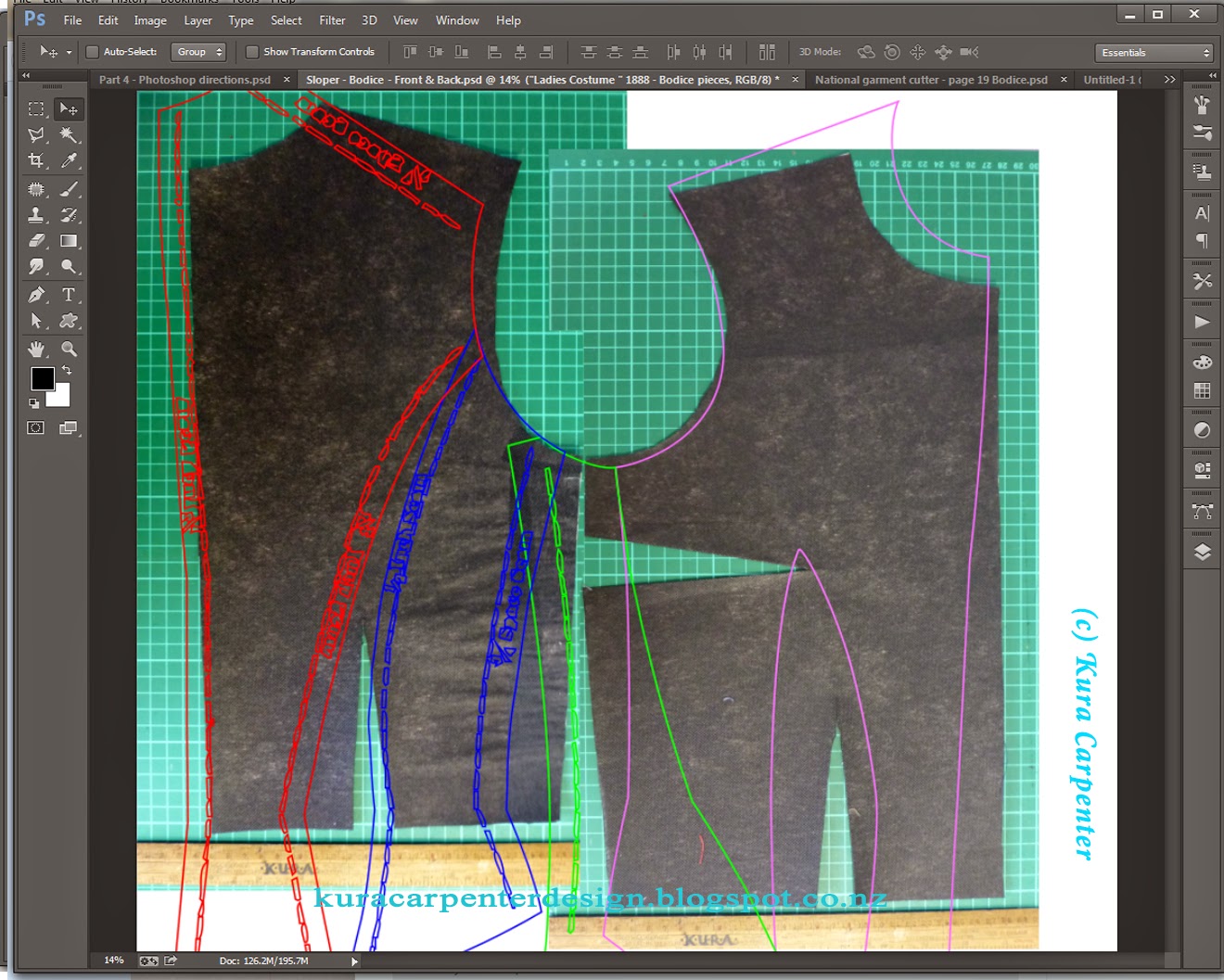
Use the Free Transform Tool on the group to scale it up to match the Sloper armhole with the Pattern pieces armhole, as best you can, but don't expect it to be perfect.


Hopefully with lining up the armholes on both Sloper and the Historical Pattern pieces you can begin to see how this merges into a final pattern, as pictured above. The historical pattern creates the "style" and the Sloper provides the necessary dimensions so it will fit you.

Now simply use the Free Transfor Tool (Control T) to manipulate the historical pattern pieces so they match up to your personal Sloper. You don't need to hold Shift anymore, just pay attention to the key areas: waistline, width and armholes, which are determinded by your Sloper.

I'm pretty happy with the way this is looking (pictured above), the armholes align and waist looks perfect at the back. While the shoulder seams are different, they're in proportion and I'm aware shoulder seams in older garments don't sit exactly on top of the shoulder they they do in modern garments.


When happy, turn off the Sloper layer and print out the historical pattern shape layers. Print them as individual layers / pattern pieces so they don't overlap each other. They'll probabably print bigger than your home printer can output and require sellotaping together but this is no biggie.

Note: you will need to hand-draw an added a seam allowance, I like to add big allowances of 1 inch / 2.5cm. See the Back Pattern piece Pictured below: (click to see larger image) Remember to add the seam allowance before you cut out the pattern pieces!

Lay out the newly printed pattern pieces on a suitable material and start cutting out your first mock-up. Be prepared to be amazed. It should fit you!!!

In this example I'm using the bodice from "Women's Costume" pages 18 to 20 of the National Garment Cutter (circa 1888) which I have downloaded as a PDF from the Internet Archive.

Any questions, just let me know, and your comments are always welcome. Have fun! Good luck!

Here's a few construction photos of when I made up this bodice:


Back panels of bodice from "Women's Costume" from the National Garment Cutter (circa 1888)

Front and Back Back bodice from "Women's Costume" from the National Garment Cutter (circa 1888)

Showing flatlined interior of bodice from "Women's Costume" from the National Garment Cutter (circa 1888)Finished garment, "Women's Costume" from the National Garment Cutter (circa 1888)